Call IQ
Overview
Call IQ reads your recorded calls and tells you two things about each one: how it sounded, and how well it was handled. It adds up across the week so you can see which routes and times of day leave callers happy, and it picks out the calls worth a second look so you do not have to listen to everything. It is part of the new dashboard and is switched on by the Early Adopter Program.
Call IQ has four sections, listed under Call IQ in the menu.
| Section | What it is for |
|---|---|
| Overview | How your calls added up over the window. |
| Call Explorer | Every call, who took it, how it sounded and how well it was handled. |
| Caller experience | Calls sorted by how they sounded against how they were handled, by route, time of day and direction. |
| Review today | The week's calls that sounded negative, were handled poorly or ran long. |
Summaries, transcripts, sentiment and satisfaction only exist for recorded calls. Call Recording must be on for the phone system and for the numbers or extensions you want covered, and Call Transcription must be set to Call Recording Intelligence. See Joining the program. Calls that were not recorded still appear in the Call Explorer.
What people see depends on their role
Overview, Call Explorer and Caller experience are open to anyone with access to reports. Summaries, transcripts, recordings and Review today need the Call Content permission. See Workspace users and roles.
How Call IQ reads a call
Sentiment is how the call sounded, read from the words in the transcript. It covers the whole conversation, both sides, and is not a score of the person who answered. It runs from -1 (very negative) to +1 (very positive) and is shown as one of five bands:
| Band | What it means |
|---|---|
| Very negative | Tense or upset language through much of the call. |
| Negative | More tense than warm, often a call about a problem. |
| Neutral | Neither warm nor tense. Most routine calls land here. |
| Positive | More warm than tense. |
| Very positive | Warm, friendly language through much of the call. |
Sentiment describes the language only. A call about a problem can sound negative and still go well.
Satisfaction is how well the call was handled, shown as a percentage. It comes from three parts, each scored on its own:
- Listening: whether the caller was heard.
- Resolution: whether their reason for calling was dealt with.
- Effort: how hard the caller had to work to get there.
Nobody is surveyed. Both are read from the call itself. Above 50% counts as Handled well.
Each call also gets an outcome: Resolved, Next step agreed, Unresolved or Can't tell.
Some calls are not scored for satisfaction, and the call says why: nobody answered live, it was an internal or test call, or it was a social call rather than a customer conversation. A new call shows Still being scored for a short while after it ends.
Overview
Overview is where Call IQ opens. Choose Today, 7 days or 30 days at the top right.
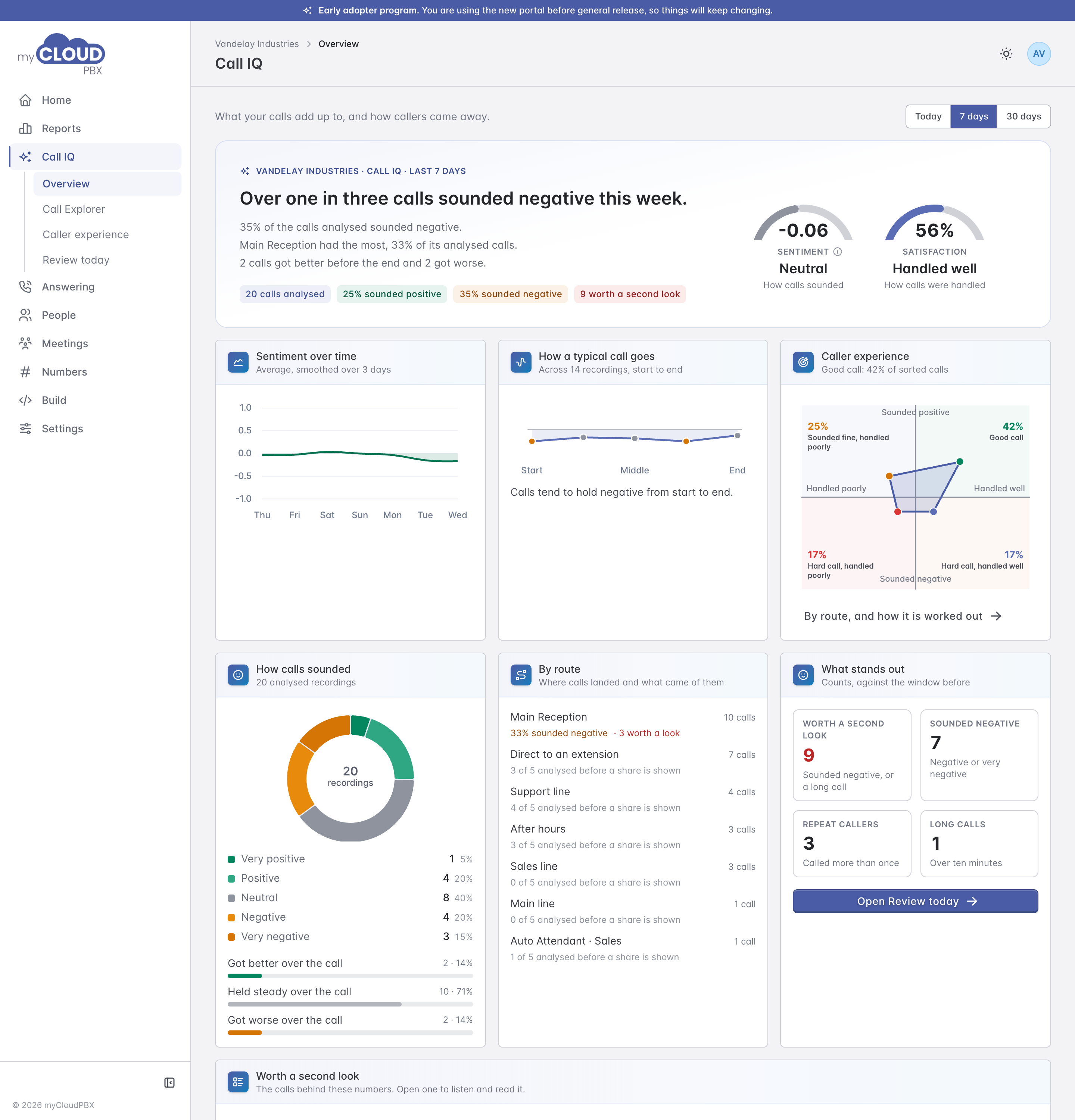
The headline sums up the window in a sentence, with the two gauges beside it: Sentiment for how calls sounded, and Satisfaction for how well they were handled. Underneath:
- Sentiment over time and How a typical call goes, which shows whether calls tend to start or end better.
- Caller experience, a small version of the Caller experience chart.
- How calls sounded, the calls in each sentiment band, and how many got better or worse during the call.
- By route, where calls landed and how they sounded on each route.
- What stands out: calls worth a second look, calls that sounded negative, repeat callers and long calls, each against the window before. 'Open Review today' goes straight to them.
- Worth a second look lists those calls with a one line summary of each. Click one to open it.
Call Explorer
Call Explorer lists every call in the window. A line at the top says what it holds, which depends on your role.
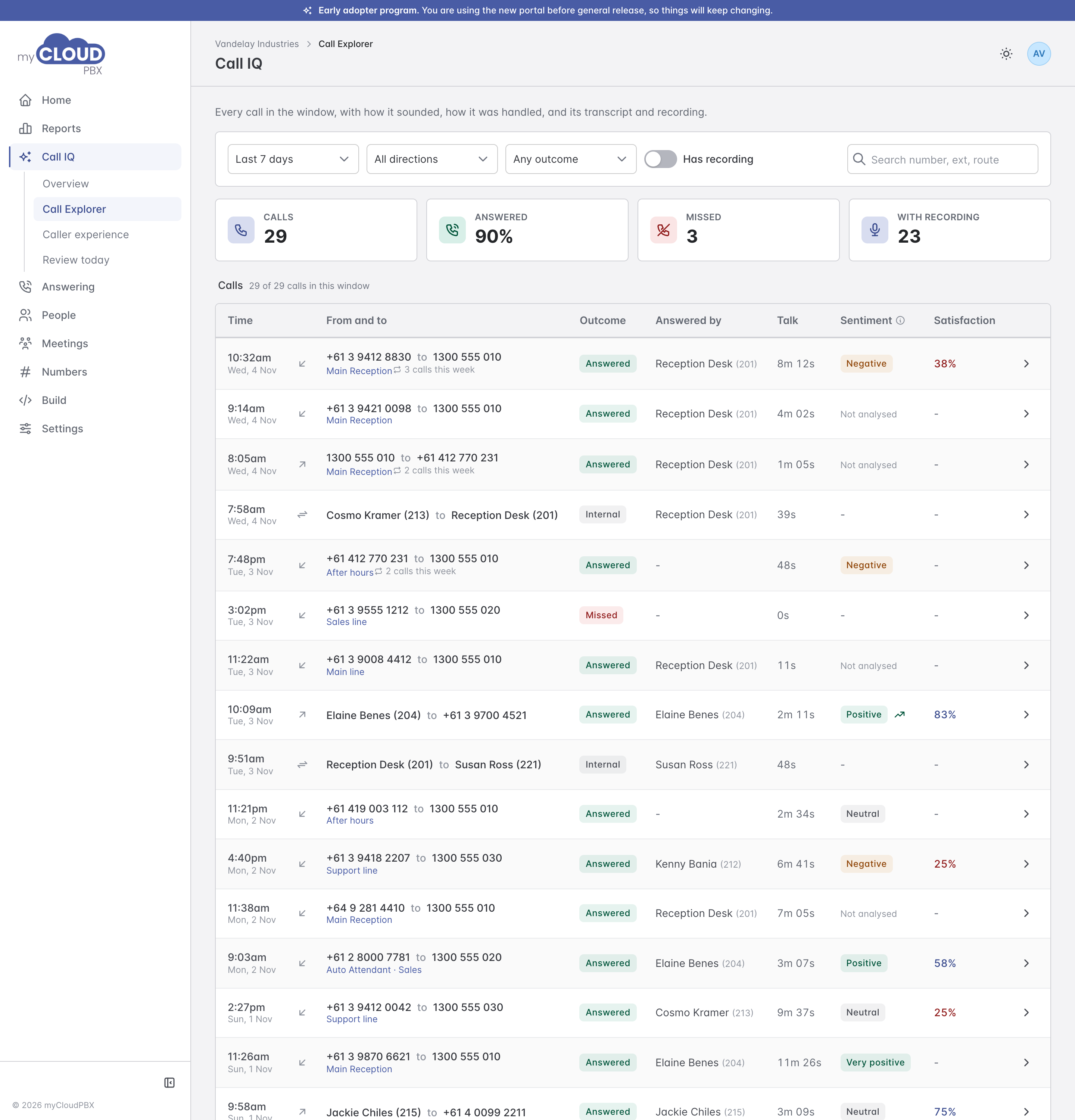
Choose the window, then narrow by direction and by outcome (answered, voicemail, forwarded, missed or internal). 'Has recording' shows only recorded calls. The search box matches numbers, extensions, names and routes. The tiles across the top count the calls, the share answered, the missed calls and how many have a recording.
| Column | What it shows |
|---|---|
| Time | When the call started. |
| From and to | The numbers, or the name and extension for anyone on your phone system, with the route beneath. A marker such as '3 calls this week' shows a repeat caller. |
| Outcome | Answered, Voicemail, Forwarded, Missed or Internal. |
| Answered by | The person who picked up. |
| Talk | How long the conversation lasted. |
| Sentiment | The call's band, with an arrow if it got better or worse during the call. 'Not analysed' means it was recorded but not read yet. |
| Satisfaction | How well the call was handled, as a percentage, when it has been scored. |
Click a call to open it.
The 'View calls' links on Home and on Caller experience open Call Explorer already narrowed to the calls behind that figure, for example the calls handled poorly. A note above the list says what it is showing, and 'Show every call' clears it.
Call detail
The call detail opens as a panel over the page and brings everything about one call together, with the transcript on the right.

| Section | What it shows |
|---|---|
| Summary | A short summary of the recording open in the transcript. |
| Call journey | What happened in order: answered, transferred, on hold, talked, hung up. |
| Who talked on this call | Each extension that took part and how long they talked. |
| Recordings | Each recording with a play button, its start time and length. |
| Caller experience | Where the call sits on the Caller experience chart, its sentiment, and its satisfaction with the Listening, Resolution and Effort bars and the outcome. |
| Call quality | A line quality grade for the call. |
| Other calls with this number | The caller's other recent calls, so you can see the pattern as well as this one. |
Transcript
Play the recording from the bar at the top and the words follow along. Click a line to jump to it, or search for a word. The arrows step between a call's recordings, and the icons beside them copy the transcript or download the recording. Speakers are labelled Speaker 1 and Speaker 2.
Each call has its own address, so you can copy the link from your browser and send it to a colleague.
Tell us when it gets a call wrong
Under some summaries and transcripts you will see 'How did we go on this summary?' with Poor, Good and Great. One click tells us whether that one was right. It appears on a sample of calls, and the X hides it.
Caller experience
Caller experience sorts every scored call by two questions at once: how did it sound, and how well was it handled?

The four corners:
| Corner | Meaning |
|---|---|
| Good call | Sounded positive, handled well. |
| Hard call, handled well | Sounded negative, handled well. Often a caller with a problem that was dealt with. |
| Sounded fine, handled poorly | Sounded positive, handled poorly. A friendly call that still fell short. |
| Hard call, handled poorly | Sounded negative, handled poorly. The calls most worth following up. |
Beside the chart, each corner shows its share of calls, typical talk time and the route it mostly comes from. 'View calls' lists them in Call Explorer. Underneath, the same split is shown over time, for callers who came back, by time of day, inbound against outbound, and by route. Click a route to lay it over the chart.
Review today
Review today lists the last seven days' calls that are worth a second look. A call is listed when it sounded negative, when it was handled poorly (satisfaction at 50% or below), or when it ran over ten minutes.

Filter by window, direction, route and length, or search a number or summary. The tiles count the calls to review, how many sounded negative, the average sentiment, and the long calls. Each call in the list shows its summary, sentiment, satisfaction, outcome and length, with a small line showing how it sounded from start to end. All, Sounded negative and Long calls narrow the list. Click a call to open it.
The list shows up to 50 calls. Call Explorer lists every call.