AutoMed CRM Configuration
AutoMed is an Australian medical practice automation platform used for patient bookings, patient communications, digital forms, recalls, repeat scripts and referrals, kiosks, payments, and related reception and back-office workflows.
Connecting AutoMed with myCloudPBX allows incoming calls to trigger AutoMed. When a patient calls the practice, myCloudPBX can trigger AutoMed to use the caller's phone number, allowing AutoMed to match the number against patient records where configured.
This helps reception staff identify the calling patient and quickly access relevant context such as patient notes, recalls due, last doctor seen, and appointment information where available.
Configuration
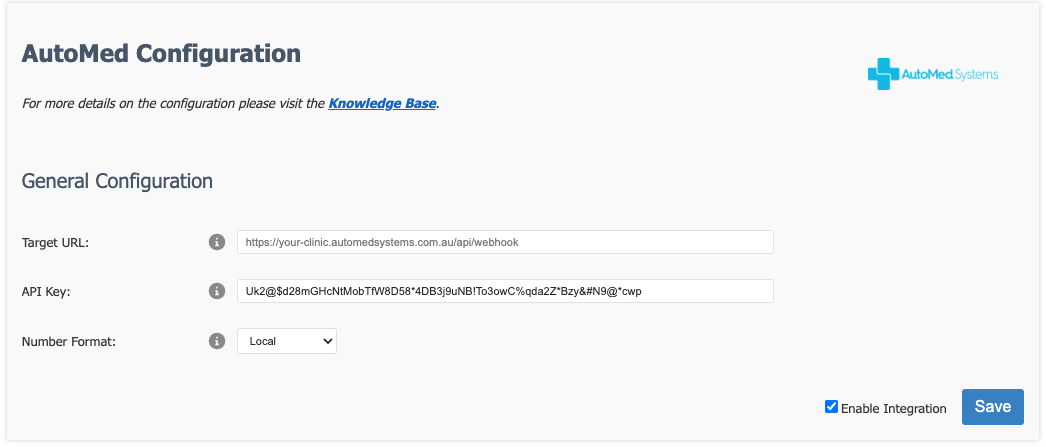
Configure the following settings that have been provided by AutoMed:
- Target URL
- API Key
- Number Format
Tip
If you do not already have this information, please contact your AutoMed representative.
Once you are happy with your configuration, click 'Save'.
Now that the settings are saved, you can enable the CRM for your PBX by sliding the 'Integration Enabled' switch to the right.
Tip
Don't forget to click Apply PBX Changes if prompted.
Disable/Enable CRM integration
Disabling the CRM temporarily is done by sliding the 'Integration Enabled' switch to the left.

This will disable the CRM for all users on the PBX.
Slide the 'Integration Enabled' switch to the right to re-enable the integration.
Remove CRM integration
Warning
Note: This action cannot be undone.
You can permanently disable the CRM integration by clicking the Remove Integration button.
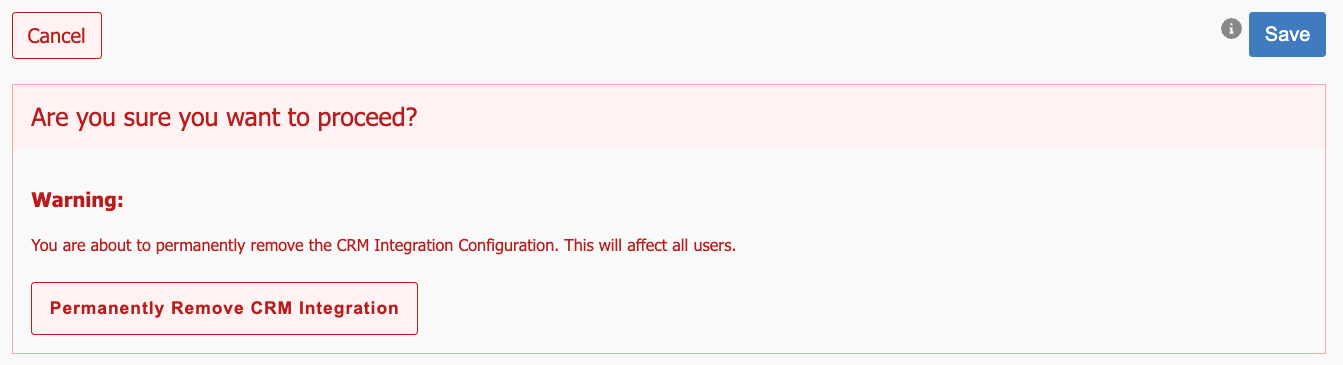
You will then be prompted again to confirm the removal of the integration.
Click 'Permanently Remove CRM Integration'.