Chats
Overview
Chats is internal messaging between people on your phone system. It is for conversations with colleagues; messages to people outside the business go through SMS.
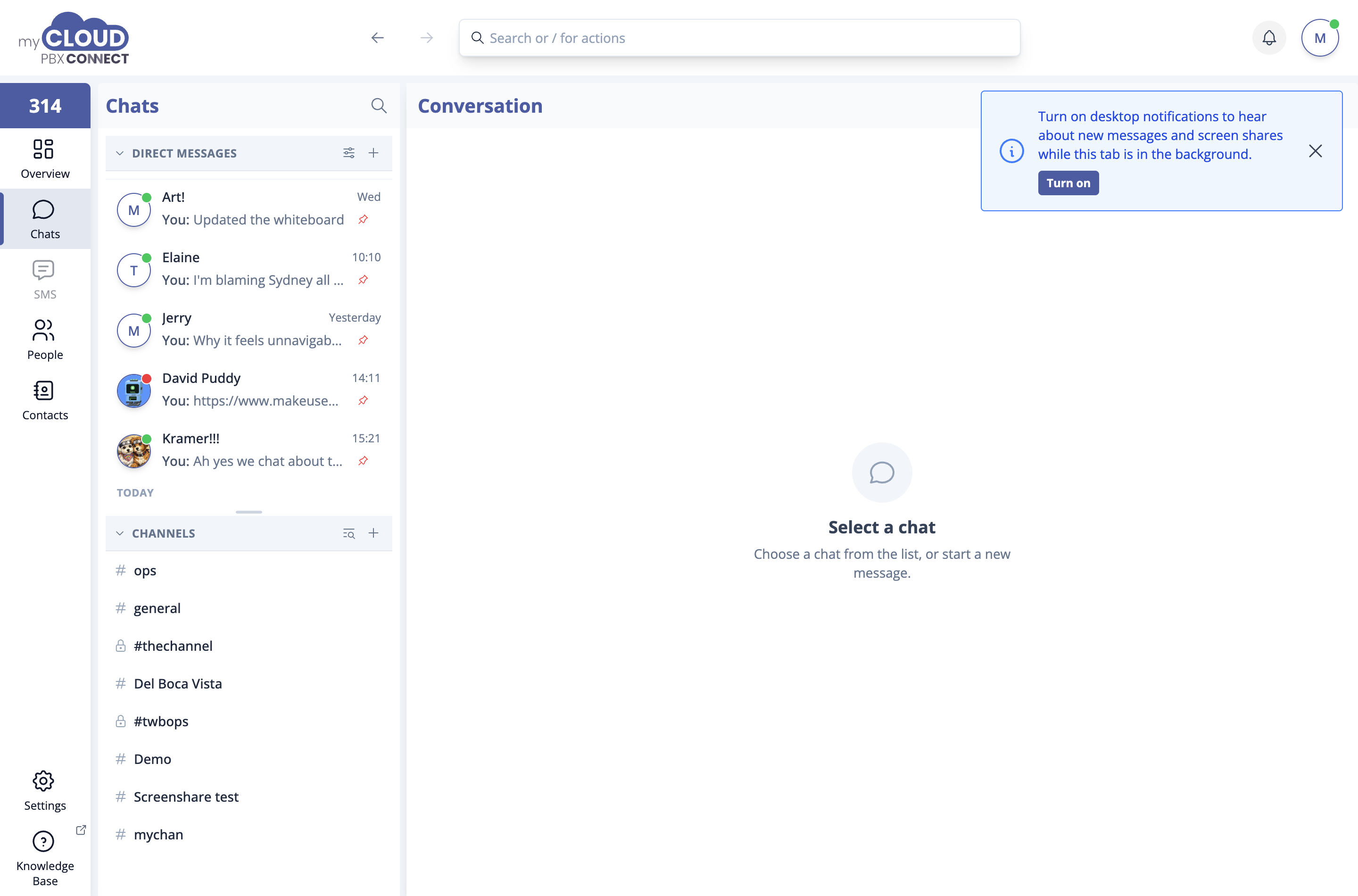
Direct messages and channels
Conversations are grouped into two kinds.
| Kind | What it is |
|---|---|
| Direct messages | One to one, or a group of up to 20 people you pick yourself. |
| Channels | Named, ongoing rooms for a team or a topic, such as ops or general. |
Each heading shows how many unread messages it holds, so a channel waiting for you stands out even when that section is collapsed. If you would rather see everything in one list, newest first, choose One list under Chat list layout in Settings.
Starting a conversation
'New message' opens New chat. Search by name, extension or email, tick the people you want, and choose 'Start chat'. Pick more than one person to start a group. If you already have a chat with exactly those people, Connect opens it instead of starting another. Note to self at the top of the list is a private chat for notes and files.
'Create channel' takes two short steps. Give the channel a name and an optional topic, choose whether it is Public or Private, then add people or choose 'Skip for now'.
'Browse channels' lists the channels that already exist. Choose 'Join' on a public one. A private channel shows Invite only.
Working with the list
- The coloured dot beside each person is their presence: available, busy, or offline. It shows whether they are signed in to Connect, not whether their phone is registered. See Presence.
- Conversations are listed under Today, Yesterday, Earlier this week and Older. 'Sort conversations' changes the order within each heading. The same preference is in Settings.
- 'Pin to top' in a conversation's menu keeps it above the rest. Click the pin to unpin it.
- A muted conversation shows a bell. Click it to unmute.
- The conversation menu also has Mark as read or Mark as unread, Remind me, Hide chat and Delete chat.
- Text you started but did not send shows as a red Draft. 'Saved drafts' at the top lists every unsent message from the last three days, so you can finish or delete them.
Inside a conversation

The header has 'Share your screen', 'Whiteboard' and 'Search', which finds a word in the conversation and steps through the matches. 'More actions' holds:
- Show starred only, to see just the messages you starred.
- Chat details or Channel details, with the people in the conversation, its notification setting, and every pinned and starred message.
- Pin channel to top for a channel.
Pinned messages sit in a banner at the top of the conversation and are visible to everyone in it. Click one to jump to it.
Messages
Hover over a message for the reaction button and 'Menu'. The menu offers:
| Option | What it does |
|---|---|
| Reply | Quotes the message in your reply. |
| Forward | Sends it to another chat or channel. |
| Copy | Copies the message with its formatting. On a message that is only a picture, it copies the picture. |
| Edit | Changes a message you sent. It is marked (edited). |
| Pin | Adds it to the pinned banner for everyone. |
| Star | Saves it for yourself. Starred messages are listed in the conversation's details. |
| Remind me | Sets a reminder about the message. See Reminders. |
| Mark unread | Marks the conversation unread from that message on, including on your other devices. |
| Hide images | Hides the pictures in a message. They stay hidden next time. |
| Delete | Removes your message for everyone within 24 hours. After that, Delete for me removes it only from your view. |
Reactions and custom emoji
Click the smiley on a message to react. Your workspace can add its own emoji: open the emoji picker, go to Custom and choose +. Pictures can be PNG, JPEG, GIF or WebP up to 512 KB, and each needs a short name. Type : and the name in a message to use one.
Mentions
Type @ and a name to mention someone. In a group or channel, @channel notifies everyone and @here notifies everyone who is online. Connect shows how many people that reaches and asks you to confirm before it sends. That check can be turned off in Settings.
Writing a message
Press Enter to send and Shift+Enter to start a new line. Inside a list, Enter adds an item and Ctrl+Enter sends.
Formatting such as quotes, lists and code works as you type, and formatted text pasted from an email or a document keeps its formatting. Press Cmd+Shift+V on a Mac, or Ctrl+Shift+V on Windows, to paste plain text instead.
The buttons under the message box insert emoji and GIFs, attach a file, share a contact, record a voice message and schedule the message.
Long messages are collapsed behind a Show more link. If you would rather always see everything in full, turn that off in Settings. You can also choose how the conversation looks: Compact or Relaxed.
Scheduling a message
The clock beside 'Send' schedules the message for Later today, This evening, Tomorrow morning or Next Monday. 'Custom time & recurring' picks a day and time and can repeat the message daily, weekly or monthly.
Scheduled messages wait in a Scheduled tray above the message box, where you can 'Send now', 'Edit' or 'Cancel' them.
Reminders
'Remind me' on a message or a conversation sets a reminder for yourself or for other people. Pick a time such as In 1 hour or Tomorrow morning, or a custom time with a repeat. When it is due, a notification takes you back to the conversation.
You can also type /remind me in 2h to call Kramer. /reminders lists the ones you have set.
Slash commands
Type / in the message box for a list of commands, or /help for all of them. Useful ones include:
| Command | What it does |
|---|---|
/chat |
Opens New chat. Follow it with one or more @ mentions to open or start a chat with those people. |
/sms |
Starts an SMS to a number or a contact. |
/remind and /reminders |
Sets a personal reminder, or lists yours. |
/find |
Finds a word in this conversation. |
/mute and /unmute |
Mutes or unmutes the conversation. |
/pin and /unpin |
Pins or unpins the conversation. |
Effects
Effects such as /fireworks, /party, /balloons and /hearts play across the screen for everyone in the conversation, with a short sound. The chat records who sent it, and 'Play again' replays it. Effect sounds can be turned off in Settings.
Files, pictures and links
- Files arrive as cards. PDFs, text and Markdown files open in a panel beside the conversation. Other files save when you click them.
- Click a picture to open it full size. When a message has several, use the arrows or the Left and Right keys to step through them.
- Right click a picture for Download, Copy image and Open preview.
- Links show a preview card, which 'Hide' collapses.
Read receipts
Ticks under your messages show whether they have been sent, delivered and read. If you would rather not share when you have read something, turn off Send read receipts in Settings. You then do not see other people's receipts either.
Notifications
Channels can notify you on every message, only when you are mentioned, or not at all. The default is set in Settings, and any channel can override it in its own details.